


Dot Link - Connect the Dots
4.813.82K Reviews
App Specs
- Version
- 3.0.1
- Updated On
- License
- Free
- Downloads
- 10,000,000+
- Developer
- Bluetile
- Categories
- Puzzle
- Platform
- Android, iOS
Screenshots


 Analysis by AppCompare
Ever had one of those moments where you're just itching for a little mental workout, but don't want anything too intense? That's exactly the zone Dot Link - Connect the Dots hits for me. It's a puzzle game that’s both engaging and soothing, perfect for zoning in on something fun while giving your brain a little exercise. If you haven't tried it yet, let me walk you through what makes this app a gem.
A small puzzle for the gaps in your day
I find this kind of puzzle easiest to enjoy when I treat a level as a brief, contained problem rather than a commitment to a long session. A few minutes while waiting for a drink or sitting through a quiet commute can be enough to focus on one board, then put the phone away. That stop-and-start rhythm is a useful fit for a game built around tracing routes, though it may not satisfy someone who wants a story, a sense of place to explore, or a reason to keep playing beyond the next puzzle.
The game is free to start, and its Everyone age rating makes it an approachable option to share with younger players or relatives who prefer simple rules. Bluetile is the developer, and the game has a 4.8 average from around 670,000 ratings, with over 10 million installs. Those figures suggest broad appeal, but they don’t tell me whether a particular puzzle style will suit you; the best test is whether planning lines feels relaxing rather than fiddly.
How I approach a crowded board
One practical habit makes the connecting mechanic easier: before drawing, look for the colors with the least room to maneuver. A pair tucked into a narrow gap can be more restrictive than dots with open space around them, so I try to reserve a plausible route for those first. Then I check whether a path I’m about to draw would divide the remaining board into awkward sections. This small pause often saves me from undoing several moves later.
That is also where the game’s simplicity becomes a genuine trade-off. The rules are quick to understand, but a board can demand careful spatial planning, and an intuitive-looking line may block another connection. If I’m tired or distracted, I sometimes make a careless move and have to rethink the layout. Players who enjoy quiet logic problems may welcome that friction; anyone looking for a puzzle that can be played entirely on autopilot may prefer something less demanding.
Choosing it over other puzzle styles
Compared with a word puzzle, this asks me to reason visually rather than search for vocabulary. Compared with a match-three game, the appeal is less about quick combinations and more about finding routes that fit together. That makes it a good alternative when I want a clear puzzle objective without a busy sequence of effects or a narrative to follow. If I want a changing set of clues, a competitive score chase, or a more varied kind of challenge, I would choose a different puzzle game instead.
It is also worth being realistic about the kind of variety this format offers: the central pleasure remains connecting matching colors within a layout. Even as boards become more involved, players who need new mechanics, character progression, or a strong story may find the experience too focused. I’d recommend it most to people who enjoy visual organization and don’t mind returning to the same basic idea with different spatial problems.
Worth Reading Before You Choose

EA SPORTS FC Mobile 26 Is a Bigger Football Game, but It Takes Time

Flipboard Shows What News Apps Must Do Beyond the Feed

Switching to Android Auto Means Rethinking Your Driving Routine

Google Calendar Makes a Crowded Week Easier to Manage

Ludo King Makes the Most of the Minutes Between Plans

Baby Panda World Brings Quick Play to Modern Phones, but Its Game Library Feels Busy
The Gameplay Experience
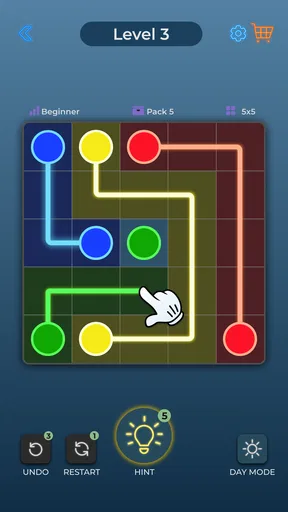
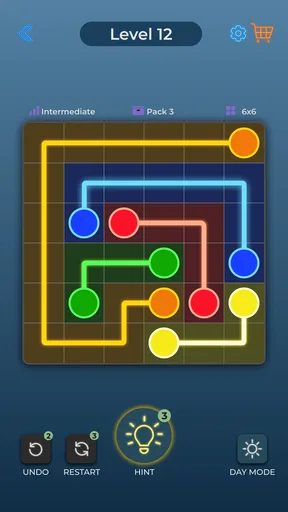
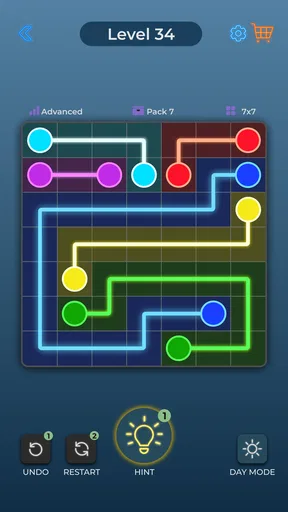
Alright, let's dive into the gameplay. The concept is simple: you connect dots of the same color without overlapping lines. Sounds easy, right? Well, it starts that way, but as you progress, the grids get more complex, and that's where the real fun begins. You're navigating through a maze of dots and planning your moves to ensure you don't paint yourself into a corner.
I've found myself getting lost in it for hours. There’s something incredibly satisfying about completing a tricky level. Plus, with the plethora of levels available, Dot Link - Connect the Dots offers endless fun without the frustration of waiting for lives to regenerate, like some other games out there.
Visuals and Sounds
Visually, the game is a treat. The design is clean, crisp, and easy on the eyes. The colors are bright but not overwhelming, striking just the right balance to keep you engaged without causing eye strain. The animations are smooth, which is a big deal since you want your lines to connect seamlessly.
The sound design complements the visuals perfectly. The gentle music and subtle sound effects provide a relaxing backdrop as you connect those dots. It's almost meditative, which is a huge plus if you're looking to unwind after a long day.
User Interface
One of the things I appreciate about Dot Link - Connect the Dots is its user interface. It's intuitive and straightforward, which means you spend more time playing and less time figuring out how to navigate the app. The menus are well-organized, and the game offers helpful hints without being intrusive.
For a useful test of whether the pacing suits you, try playing when you have only a short break rather than saving it for a long session. If a board feels clear enough to pick up and set down, the gentle rhythm works in your favor. If you find yourself needing a long stretch of uninterrupted concentration to enjoy each puzzle, this may be better as an occasional game than a daily habit.
The current version is 2.9.2, and it supports devices running Android 7.0 or later. The game is free, with optional in-app purchases ranging from $0.99 to $17.99 per item. I’d treat those purchases as a personal choice rather than a requirement: the basic appeal is the board-solving itself, so decide whether any paid option is worthwhile for the way you play instead of assuming you need to spend to understand the game.
When the calm can feel too quiet
The relaxed presentation is a strength when I want a low-pressure break, but it also sets expectations. This is not the kind of game I reach for when I want a loud, fast-moving distraction. Its measured feel depends on giving each board a little attention, and the visual calm may not provide enough stimulation for players who prefer energetic effects, frequent changes of pace, or a strong sense of progress beyond solving the next layout.
There is a practical balance to strike, too. Bright colors help distinguish the pairs, while the clean board keeps the routes readable; still, visual planning is the whole point, so anyone who finds color-based matching uncomfortable may not find this format pleasant. I’d try a few puzzles before committing to longer sessions, and take a break if you notice yourself squinting or rushing. The game works best when I can look carefully without turning a short pause into a strain.
Even the hint option is most useful when I use it as a nudge, not as a substitute for solving every awkward section. I first scan for constrained pairs and test a route mentally; if I’m still stuck, a hint can help me regain momentum. That keeps the satisfying part—spotting how the paths fit together—at the center. If I use help immediately whenever a board looks busy, I lose much of the reason I opened a logic puzzle in the first place.
Who will enjoy the puzzle, and who may not
I’d point a casual player toward it if they like neat visual problems, want rules they can grasp quickly, and are happy to work through one board at a time. It can also suit someone who wants a quiet alternative to scrolling during a short wait, or a simple shared activity where players can suggest routes and compare ideas. The Everyone rating supports its broad accessibility, although individual comfort with color-focused puzzles still matters.
I would steer away a player who needs a plot, a collection of distinct puzzle mechanics, or a competitive goal to stay engaged. It is also not my pick for a moment when I need to divide attention between the phone and a conversation or task: a line that looks harmless can close off a route, and careless tapping can turn a calm puzzle into needless backtracking. For a more varied challenge, a word game or a puzzle with changing rule sets is likely a better match.
Why the mood works—and where it stops
Dot Link is a puzzle game from Bluetile that keeps its setting deliberately spare: the board, the colored dots, and the paths do the expressive work. There is no elaborate world competing with the problem in front of me. That restraint helps the visual language stay coherent, because every color and line has a clear job. The mood comes from the contrast between a simple-looking grid and the careful thinking needed to complete it.
The sound and animation reinforce that same focus. Gentle music can soften the feeling of effort, while clear line movement makes a completed connection easy to read. I like that the presentation does not need to overwhelm the board to make a solved route satisfying. The trade-off is that this quiet style may blur into the background for someone who wants memorable characters, dramatic music, or a stronger change in atmosphere as they play.
The game was released on February 13, 2023, and its current version is 2.9.2. I wouldn’t treat a version number as a promise about what a future update will add; what matters for a new player is that the core experience is easy to understand. Its 13,000 reviews offer another sign that many people have spent time with it, but personal fit still comes down to whether line-planning is the kind of thinking you enjoy.
So, if you’re deciding what to install, ask yourself whether you want a calm visual logic challenge or a more varied game. If the former sounds right, start with a short session and pay attention to how the boards feel: satisfying when you spot a route, or frustrating when one choice blocks another. That reaction is a better guide than popularity alone. I’d choose it for quiet focus, but not as my first recommendation for action, storytelling, or a steady stream of new mechanics.
Why You Should Download It
If you’re someone who enjoys puzzles, you’ll likely find yourself hooked on this one. It's a fantastic way to kill time and keep your mind sharp. The app is free to download, which is always a win, and while there are in-app purchases, they’re not necessary to enjoy the full experience. Plus, it’s available on both Android and iOS, so you can get your puzzle fix no matter your device.
Overall, Dot Link - Connect the Dots is a delightful game that offers both a challenge and a way to relax. Whether you’re waiting for a bus, taking a break from work, or just looking to unwind, it's the perfect companion. Give it a try, and you might just find it becoming your new go-to app!
Pros
- Intuitive interface for seamless gameplay.
- Wide variety of levels to keep you engaged.
- Minimalist design enhances focus and relaxation.
- No intrusive ads disrupting the experience.
- Smooth performance across devices.
Cons
- Limited hints can stall progress.
- Repetitive gameplay may bore some users.
- Requires internet for some features.
- Sound effects can become repetitive.
- No multiplayer mode available.
FAQs for Dot Link - Connect the Dots
What is the main objective of Dot Link - Connect the Dots?
Dot Link - Connect the Dots is a puzzle game where the main objective is to connect dots of the same color on a grid. The challenge lies in connecting all dots without overlapping lines, requiring strategic thinking and planning to complete each level successfully.
Is Dot Link - Connect the Dots free to play?
Yes, Dot Link - Connect the Dots is free to download and play. However, it may contain in-app purchases or ads that can enhance the gaming experience or remove advertisements, offering a smoother gameplay experience for those interested.
What platforms is Dot Link - Connect the Dots available on?
Dot Link - Connect the Dots is available for download on both Android and iOS devices. You can find it in the Google Play Store for Android users and the Apple App Store for iOS users, providing accessibility to a wide range of smartphone users.
Does Dot Link - Connect the Dots require an internet connection to play?
No, Dot Link - Connect the Dots does not require a constant internet connection to play. This allows users to enjoy the game offline, making it a great option for playing during travel or in areas with limited connectivity.
Are there any tips for beginners playing Dot Link - Connect the Dots?
For beginners, it's helpful to start by connecting the longest paths first, as this can simplify solving the entire puzzle. Additionally, pay attention to the grid size and plan your moves carefully to avoid blocking paths for other connections. Practice and patience are key to mastering the game.


